 Calculating arrival date




Genuine OEM HP Color LaserJet Pro MFP M479 fdw Toners
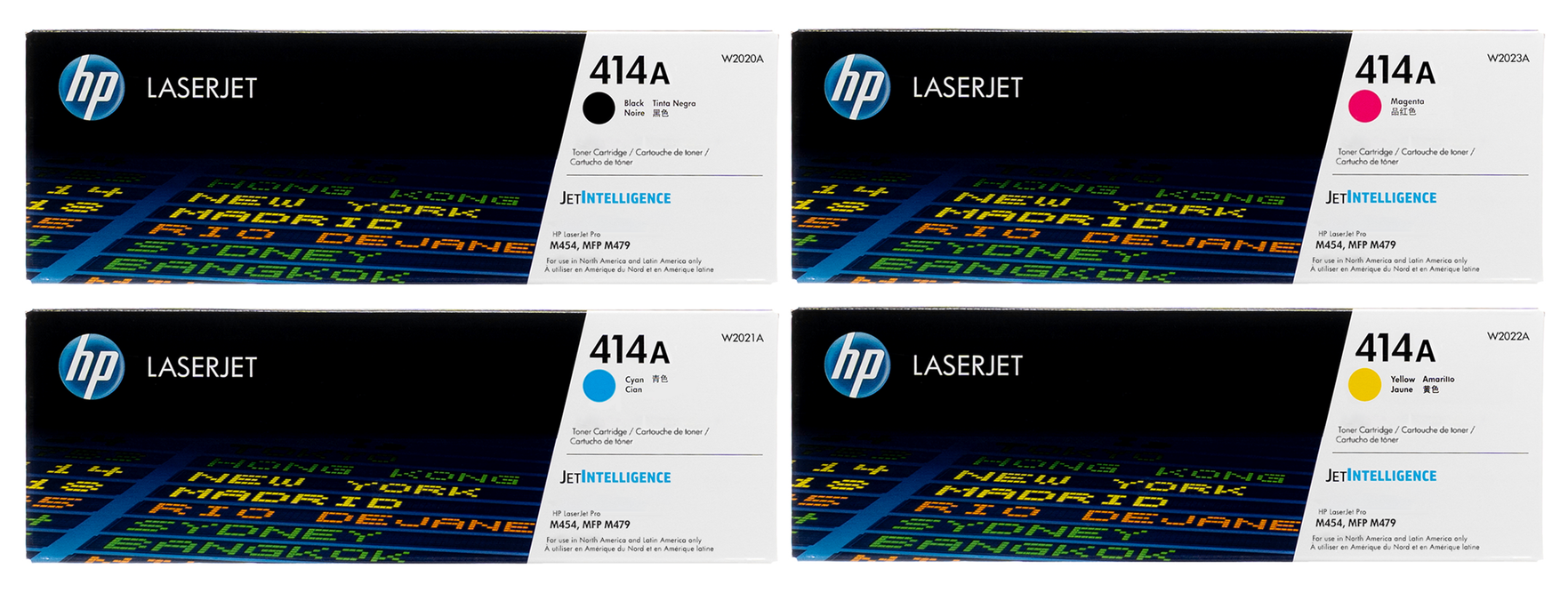
The HP MFP M479fdw uses four separate color cartridges all in the HP 414 family. HP 414A cartridges are a standard capacity, while the HP 414X cartridges are high yield.
Toner options for the HP MFP M479fdw include:
➜ The HP414X high-yield set:
This high-yield set of toners can print approximately 7,500 black pages and 6,000 color pages.
➜ The HP414A standard yield set:
This standard-yield set of toners can print approximately 2,400 black pages and 2,100 color pages.
Individual cartridges are also available in both standard and high-yield versions.
Toners for HP Color LaserJet Pro MFP M479 Fdw
More about HP Color LaserJet Pro MFP M479 fdw
All-In-One Powerhouse
HP 414 toners are the heart and soul of the HP Color Laserjet Pro Printer MFP M479fdw — an all-in-one, multifunction printer that can do it all. As the multifunction name implies, this printer can copy, scan, and fax as well as print.
With a maximum monthly duty cycle of 50,000 pages, the HP MFP M479fdw is a great printer for small- to medium-size business offices.
Just don’t forget to stock up on HP 414 replacement cartridges if you plan to print that much! In fact, stick with the high capacity 414X series.
The HP MFP M479fdw is fast and delivers high-quality prints with great color reproduction. Double-sided scanning and copying mean you can save a ton of time without having to flip documents over.
The HP MFP479fdw is capable of print speeds up to 28 pages per minute, making it a great choice for a busy workplace. With a print resolution of 600 x 600 DPI, you can be sure your color prints will look vibrant and sharp with genuine HP 414 toners.
Bigfoot Footprint
The HP MFP M479fdw is a big machine built for big tasks. It weighs in at just over 51 lbs, and, with the front tray open and the rear door open, the HP MFP M479fdw covers almost 41” of desktop space. This rear access door is especially helpful if you need to clean the inside print rollers or clear paper jams.
The machine features a 50-page automatic document feeder on top, a large 4.3” touchscreen display, a USB port for walk-up printing, a 50-sheet manual page loader, and a 250-sheet lower paper tray. (You can also purchase an additional paper tray that holds 500 sheets.)
The back of the printer has several communications ports, including fax and telephone jacks, and connections for USB A, USB B, and Ethernet. The power cable for the HP MFP M479fdw plus into the lower-left port.
Remote Access and Safety
The HP Smart app allows you to access many of the printer’s features remotely, including printing images from your phone.
Two interesting features of the HP MFP M479fdw are cartridge policy restriction and cartridge protection.
Cartridge policy restriction only allows the use of genuine HP 414 toner cartridges — no third-party brands.
The cartridge protection feature registers toner cartridges so they can’t be used in another machine if stolen. Hey, HP 414 cartridges are costly, and you don’t want the folks from your accounting department sneaking down and swiping the cartridges out of the shipping department’s printer and vice versa. Hands off, people!
Both of these features are turned off by default and must be turned on in the M479fdw’s settings panel.
The M479fdw has a variety of features that will appeal to IT and security buffs. The machine can be set so that each user must enter a PIN number in order to use the machine.
You can also send confidential information to an encrypted USB flash drive, where the information is securely stored for later printing.
How To Replace The Toner Cartridges On Your HP M479fdw
The toner cartridges on the HP M479fdw are located in a tray inside the machine.
To access the toner cartridges, lower the front auxiliary paper feed panel and then open the front access door.
-
Slide the toner cartridge tray out. The cartridges, from front to back, are ordered black, cyan, magenta, and yellow. A color tab on the toner tray will let you know where the replacement cartridges should go.
-
Grab the tab located on the top of the toner cartridge and lift up to remove it from the machine.
-
Remove the safety tape from the replacement cartridge
-
Insert the new cartridge into the empty slot until it clicks into place
-
If applicable, slide the green corona wire tab back and forth several times on each of the replacement toner cartridges
-
Close the toner cartridge tray
-
Close the front access panel and auxiliary paper feed panel
-
Resume printing
The products below are genuine OEM HP Supplies made for the HP Color LaserJet Pro MFP M479 fdw.
- OEM HP Supplies
- Fits HP Color LaserJet Pro MFP M479 fdw
- 0 products for this printer
There are no products listed under this category.
Why Shoppers Choose Toner Buzz
178K+ orders shipped nationwide
58K+ happy customers served
5-star rating based on 14,000+ reviews
17+ years in business